How to Match a Supplier Price List to Amazon ASINs Without Barcodes
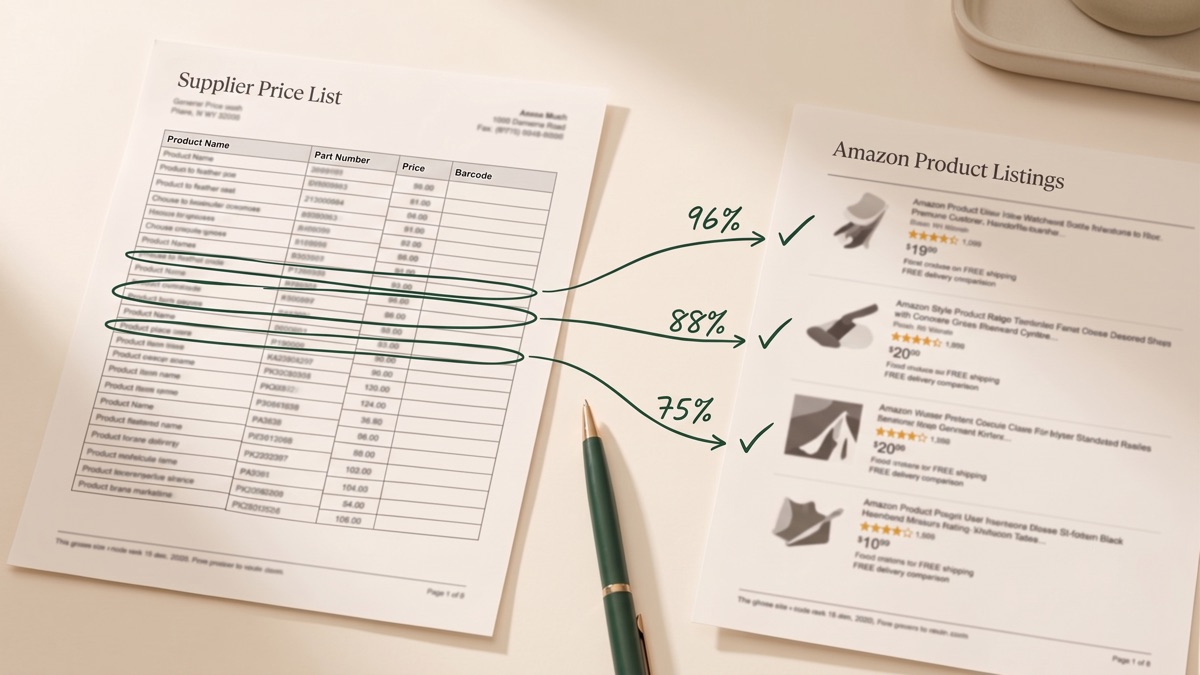
Every wholesale seller knows this moment. A supplier sends a price list, you run it through a UPC to ASIN converter, and most rows come back matched. Most, not all. A block of rows sits empty, and you look at those brand names and think: no way these products are not on Amazon.
You are usually right. On one real distributor file we processed, 129,000 rows went in and about 13,000 came back with no match. The products were almost all on Amazon. The barcodes just could not find them.
And that is the good case, because that file at least had barcodes. Brands and manufacturers often send price lists with no UPC or EAN column at all: just brand, description, and a part number, because style numbers are how they inventory their own products. For those files, a barcode converter has nothing to work with, and the whole file is an empty block.
This article covers why that happens, what you can do about it today, and the AI matching tool we are building at ASINScope to close the gap for good.
Why barcode lookup misses products that are on Amazon
Barcode conversion fails for reasons on both sides of the match:
- The supplier file has no codes. Distributors sell by UPC, but brands sell by style number. A price list straight from a manufacturer often carries MPN, description, and case pack, and nothing else. This is the most common cause and it affects entire files.
- The Amazon listing was created without a UPC. Sellers can create listings through brand registry or GTIN exemptions, so a listing may simply have no barcode attached. Your code is valid, the product is live, and the lookup still returns nothing.
- The packaging changed. The same product gets a new UPC when the packaging is refreshed. Your supplier ships the current code; the Amazon listing carries the old one.
- One code, many listings. The opposite failure: a single UPC resolves to several ASINs, because the product exists as a single unit, a 2-pack, a 3-pack, and a 6-pack. On the file above, 129,000 input rows returned 199,000 result rows. Which of those are actually your product at your cost is a question the barcode cannot answer.
What you can do today
Honest answers first. These are the current options, and we recommend them in this order:
| Method | What it costs | Where it breaks |
|---|---|---|
| Manual Amazon search by brand, title, or part number | Free, about 3 minutes per SKU | Does not scale. 13,000 rows is roughly 650 working hours, and nobody records which rows were verified versus guessed |
| Ask the supplier for barcodes | Free | Slow, and brands frequently do not keep GTINs per style. Sometimes the codes simply do not exist |
| GTIN / UPC databases | Subscription | Coverage is weakest exactly where you need it: brand-direct catalogs that never registered retail barcodes |
| A VA team | Cheap per hour | Inconsistent between operators, and the output is unauditable |
| Drop the unmatched rows | Free | You silently give up the products your competitors are not selling, which are often the best margin on the file |
If your file does have barcodes, run it through the free bulk UPC to ASIN converter or the EAN to ASIN converter first. Everything below is about the rows those tools cannot reach.
The harder problem: matches that look right and are not
The empty cells at least announce themselves. The more expensive failure is invisible: a match that resolved to the wrong listing.
The classic case is pack size. Your supplier line is a single unit, the matched ASIN is a 3-pack, and Amazon's data does not flag multi-packs. Every downstream number, cost per unit, fees, margin, and velocity, is now wrong by a factor of three, and nothing in your spreadsheet looks unusual. Editions and variants behave the same way: a book title can resolve to 6 to 17 listings where only one is the printing you actually stock.
Any serious matching tool has to solve this side too. Finding more candidates without telling you which candidate is right just produces wrong answers faster.
What we are building: matching with confidence you can act on
We are building an AI product matcher into ASINScope that works from whatever identifying fields your file has: brand, title, part number, and barcode when present. All fields are optional; more fields mean higher confidence.
For each input row it returns candidate Amazon listings, and every candidate carries three things:
- A confidence score you can filter and threshold.
- Provenance: exactly which evidence produced the match, so a barcode hit and a text-similarity guess are never dressed up the same way.
- The why and the why not: pack size, variant, capacity, edition, and whatever else distinguishes the candidates.
Here is what one row looks like. Input from a price list with no barcode column:
| Brand | Part number | Description |
|---|---|---|
| DEWALT | DCB205 | 20V MAX 5.0 Ah Lithium-Ion Battery |
Output:
| Candidate listing | Confidence | Matched on | Why / why not |
|---|---|---|---|
| DEWALT 20V MAX Battery, 5.0 Ah (DCB205) | 96% · confirmed | Brand + part number + title attributes | Single unit; voltage and capacity match the input row |
| DEWALT DCB205-2 20V MAX 5.0 Ah, 2-Pack | 88% · needs review | Brand + part number stem | Same product, but a 2-pack. Unit cost math changes if this is your match |
| DEWALT DCB204 20V MAX 4.0 Ah Battery | 35% · no match | Title similarity only | Part number differs by one character and capacity is 4.0 Ah, not 5.0. Not the same product |
Three states, never two: confirmed, needs review, and no match. A low-confidence guess will never appear in the same column as a verified hit, because a wrong match you cannot detect is worse than an honest empty cell.
And one pricing promise up front: you will not be charged for rows the matcher cannot resolve. You pay for answers, not attempts.
Get early access
The matcher is in development now, and we are onboarding a limited group of early users who will shape how it works.
Join the early access list. It takes 30 seconds: leave your email and tell us what your typical supplier files look like.
Even better: send us a real price list. We are running free file checks for the first 25 early access members. You get back a pre-flight report on your actual file: how many rows carry usable identifiers, how many we can match confidently, and where the problem rows are. No charge, no commitment, and your file is not shared with anyone.
FAQ
How do I convert MPN to ASIN in bulk?
Today there is no reliable self-serve way to do it at file scale. Part numbers are not globally unique the way barcodes are, so a raw MPN lookup returns noise, and near-identical part numbers (one character apart for a different size or capacity) produce confident wrong answers. This is exactly the gap the AI matcher is built for: it combines MPN with brand and description and returns scored candidates instead of a single blind guess.
Can I find an ASIN from a product title?
One at a time, yes: paste the title into Amazon search and eyeball the results. At file scale the same approach needs software that can compare titles the way a human does, tolerating word order, abbreviations, and marketing filler, and then verify the candidate against brand and attributes. That is title-based matching with a confidence score, and it is part of what we are building.
Why does a valid UPC return no ASIN?
Usually one of two reasons: the Amazon listing was created without a barcode (brand registry and GTIN-exempt listings), or the product's packaging changed and the listing carries a different UPC generation than your supplier ships. In both cases the product is on Amazon and reachable by brand, title, and part number.
How accurate is AI product matching?
Accuracy is not one number, and any tool that quotes one without context is hiding something. What matters is that every match declares its evidence and its confidence, so you decide what gets auto-accepted, what gets reviewed, and what stays unmatched. Our design rule is simple: the tool must never present a guess as a verified fact.
Rows without barcodes are not lost inventory, they are unclaimed inventory. Join the early access list and be first in line when the matcher opens up, or beat the queue by sending a real file for a free pre-flight check.
